Getting started
ONLYOFFICE supports three ways to extend editor functionality: plugins, macros, and custom AI tools. This page helps you choose the right approach and get started.
If you prefer to start coding right away, go directly to the quick start guides or try things out in the interactive playground.
What you can build
Plugins — interactive tools with rich UI
Build sophisticated integrations that feel native to ONLYOFFICE.
Perfect for:
- Embedding external content (YouTube, media galleries)
- Third-party integrations (Translator, Zotero, CRM systems)
- Advanced processing (OCR, image manipulation, data visualization)
- Custom workflows (form builders, approval systems, templates)
Development profile:
- Time: 2-7 days | Skill: Intermediate | Tech: HTML/CSS/JavaScript
- Distribution: ONLYOFFICE Marketplace or private deployment
Browse live examples in ONLYOFFICE Marketplace
Macros — instant automation scripts
Lightweight JavaScript that runs directly in documents — no installation needed.
Perfect for:
- One-click formatting (Reset text properties — quickly reset your text to default formatting)
- Batch operations (Remove empty tables — remove all empty tables across the entire document)
- Custom calculations (Find weighted average — calculate a weighted average on the selected range)
- Document cleanup (Remove empty paragraphs — remove all unnecessary blank paragraphs across the entire presentation)
Development profile:
- Time: 30 mins - 2 hours | Skill: Beginner | Tech: JavaScript basics
- Distribution: Copy-paste code or embed in document templates
Custom AI tools — intelligent assistants
Custom tools enhanced with AI capabilities for next-generation document workflows.
Perfect for:
- Writing assistance (Check spelling — AI-powered spell checking)
- Smart styling (Change text style — AI-powered text styling)
- Automatic shape generation (Add shape — AI-powered presentation design)
- Data insights (Explain formula — AI-powered formula explanations)
Development profile:
- Time: 3-10 days | Skill: Advanced | Tech: Plugin API + AI provider integration
- Requirements: API keys for OpenAI, Claude, or custom AI services
Browse all AI function examples
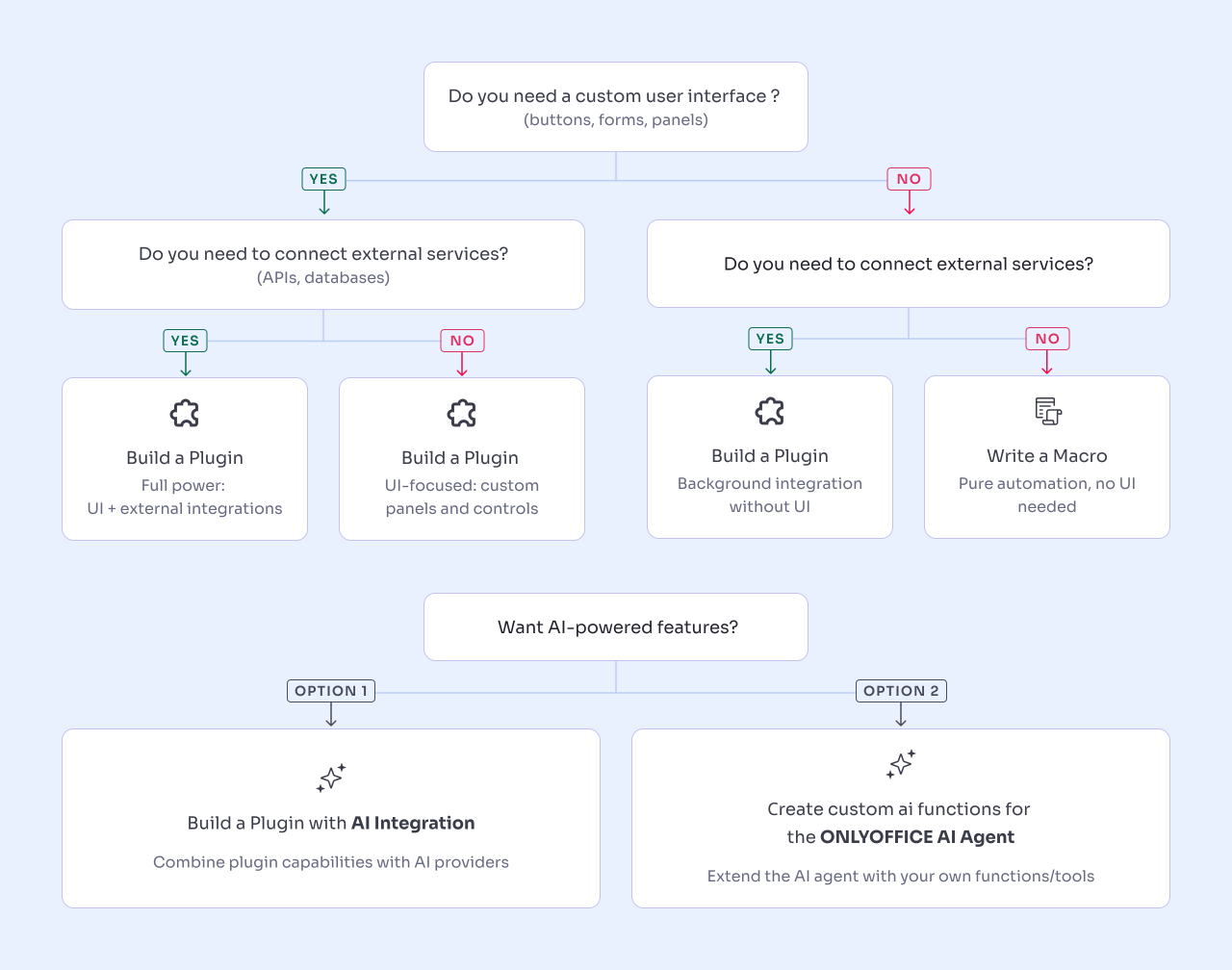
Which approach would you choose?
Answer these questions to find your ideal path:
Detailed comparison
| Feature | Plugins | Macros | AI plugins |
|---|---|---|---|
| What is it? | HTML/CSS/JS app embedded in editor | JavaScript code in documents | Plugin + AI provider integration |
| Installation | Required (marketplace or manual) | None (embedded in docs) | Required (like plugins) |
| User interface | ✅ Full custom UI | ❌ No UI | ✅ Full custom UI |
| External APIs | ✅ Yes (REST, GraphQL, etc.) | ❌ No | ✅ Yes (AI services required) |
| Offline use | ⚠️ Depends on features | ✅ Fully offline | ❌ Requires internet |
| Skill level | Intermediate | Beginner | Advanced |
| Dev time | 2-7 days | 30 mins - 2 hours | 3-10 days |
| Distribution | Marketplace, GitHub, private | Copy-paste, templates | Marketplace, private |
| Best for | Reusable tools, integrations | Personal automation | AI-powered features |
| Framework support | ✅ React, Vue, Angular | ❌ Vanilla JS only | ✅ Any framework |
Troubleshooting
Plugin issues
Plugin doesn't appear:
- Check
config.jsonhas a unique GUID - Verify file paths are correct
- Restart ONLYOFFICE
JavaScript errors:
- Open browser DevTools (F12)
- Check the Console tab for error messages
- Verify
plugin.jsis loaded
API methods fail:
- Ensure your ONLYOFFICE version supports the method
- Check method syntax in the API reference
- Verify editor type compatibility
Macro issues
Macro doesn't run:
- Check macros are enabled in Tools → Settings
- Look for syntax errors in the macro editor
- Verify API method names are correct
Unexpected results:
- Add
console.log()statements for debugging - Test each step individually
- Check document state before running
Need more help?
- Developer Forum — Community support
- GitHub Issues — Report bugs
- Stack Overflow — Q&A archive
Resources
Development tools
- Interactive playground — Test code without installation
- UI component library — Pre-built components
- Plugin templates — Starter projects
- Browser DevTools — Debugging guide
Sample code
- Plugin examples — Working examples
- Macro examples — Common automation scripts
- AI function examples — AI integration patterns
Documentation
- API reference — Complete API documentation
- Plugin structure — Configuration guide
- Macro guide — Macro development
- AI integration — AI plugin setup
- FAQ — Frequently asked questions
Community
- Forum — Ask questions, share projects
- GitHub — Source code, issues, contributions
- Stack Overflow — Technical Q&A
- Changelog — Latest API updates
Next steps
Start building:
Experiment:
Learn more: