Editor
The editorConfig section defines the editor interface parameters.
actionLink
type: object
The data received from the document editing service using the onMakeActionLink event or the onRequestSendNotify event in data.actionLink parameter, which contains the information about the action in the document that will be scrolled to.
Example:
{
  action: {
    type: "bookmark",
    data: "bookmark_name",
  },
}
actionLink.action
type: object
The action object that defines what to scroll to in the document.
actionLink.action.type
type: "bookmark" | "comment"
The type of action in the document.
Example: "bookmark"
actionLink.action.data
type: string
The data associated with the action: the bookmark name or the comment ID.
Example: "bookmark_name"
callbackUrl
type: string | required
The absolute URL to the document storage service. This service must be implemented by the software integrators who use ONLYOFFICE Docs on their own server.
Example: "https://example.com/url-to-callback"
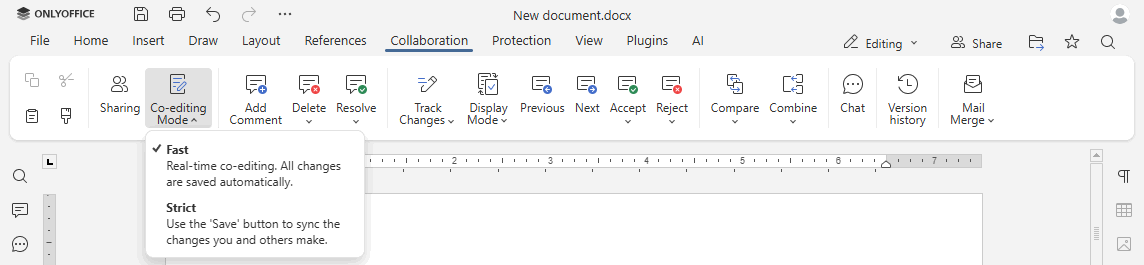
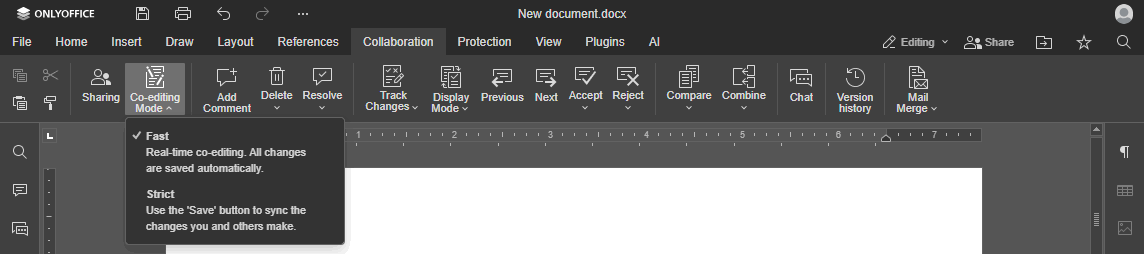
coEditing
type: object
The co-editing mode and the possibility to change it. This parameter is used to apply the co-editing and viewing modes.
Example:
{
  "mode": "fast",
  "change": true
}
coEditing.mode
type: "fast" | "strict" | default: "fast"
The co-editing mode.
In case mode setting is changed in the editor interface, it will be stored in the browser local storage and will overwrite any values sent as the editorConfig.coEditing.mode parameter. The fast mode requires autosave to be enabled, so customization.autosave will be forced to true if it is set to false.
Example: "fast"
coEditing.change
type: boolean | default: true
Whether to allow changing the co-editing mode in the editor interface.
Example: true
createUrl
type: string
The absolute URL of the document where it will be created and available after creation.
If not specified, the Create button will not be displayed. Instead of this parameter, you can use the onRequestCreateNew event.
Example: "https://example.com/url-to-create-document"


fileChoiceUrl
type: string
The URL of the file selection dialog opened in an iframe for inserting images, selecting documents for comparison, or choosing mail merge data sources. The URL can contain the {documentType} and {fileExt} placeholders, which will be replaced with the appropriate values (e.g., ImagesOnly, DocumentsOnly).
The {documentType} placeholder is required for the Image from Storage and Document from Storage buttons to appear.
Instead of this parameter, use the onRequestInsertImage, onRequestSelectDocument, or onRequestSelectSpreadsheet events.
Example: "https://example.com/filechoice?type={documentType}"
lang
type: string | default: "en"
The editor interface language. Uses two-letter (de, ru, it, etc.) language codes.
To translate the editor interface into Portuguese (Portugal) or Chinese (Traditional, Taiwan) (added in version 7.2), use the four-letter language codes pt-PT or zh-TW, respectively. The two-letter pt language code sets Portuguese (Brazil) and the zh code specifies Chinese (People's Republic of China).
Supported language codes
| Code | Language |
|---|---|
ar | Arabic |
az | Azerbaijani |
be | Belarusian |
bg | Bulgarian |
ca | Catalan |
cs | Czech |
da | Danish |
de | German |
el | Greek |
en | English |
es | Spanish |
eu | Basque |
fi | Finnish |
fr | French |
gl | Galician |
he | Hebrew |
hr | Croatian |
hu | Hungarian |
hy | Armenian |
id | Indonesian |
it | Italian |
ja | Japanese |
ko | Korean |
lo | Lao |
lv | Latvian |
ms | Malay |
nl | Dutch |
no | Norwegian |
pl | Polish |
pt | Portuguese (Brazil) |
pt-PT | Portuguese (Portugal) |
ro | Romanian |
ru | Russian |
si | Sinhala |
sk | Slovak |
sl | Slovenian |
sq | Albanian |
sr | Serbian (Latin) |
sr-Cyrl | Serbian (Cyrillic) |
sv | Swedish |
tr | Turkish |
uk | Ukrainian |
ur | Urdu |
vi | Vietnamese |
zh | Chinese (Simplified) |
zh-TW | Chinese (Traditional) |
Example: "en"
location
type: string | default: ""
The default measurement units. Specify us or ca to set inches.
Starting from version 8.2, please use the region parameter instead.
Example: "us"
mode
type: "edit" | "view" | default: "edit"
The editor opening mode.
Example: "view"
mergeFolderUrl
type: string
The absolute URL to the folder for saving the mail merge result.
Instead of this parameter, use the onRequestSaveAs event.
Example: "https://example.com/url-to-merge-folder"
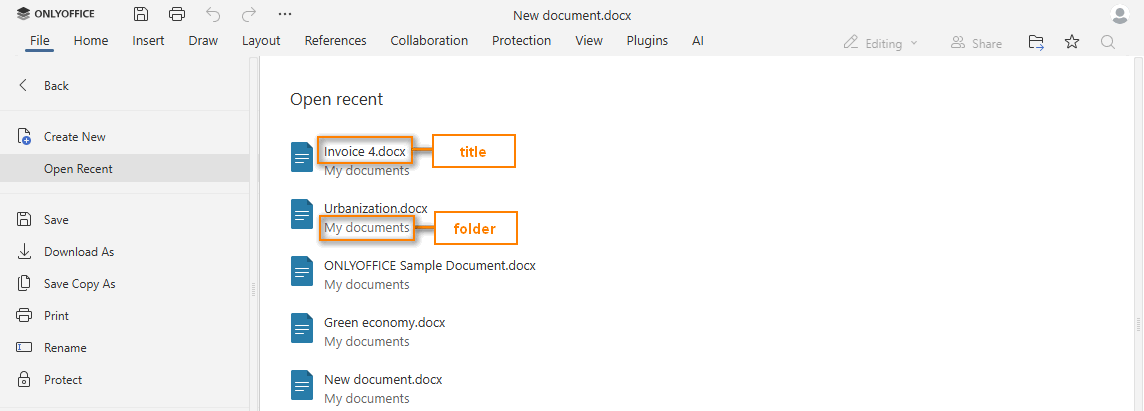
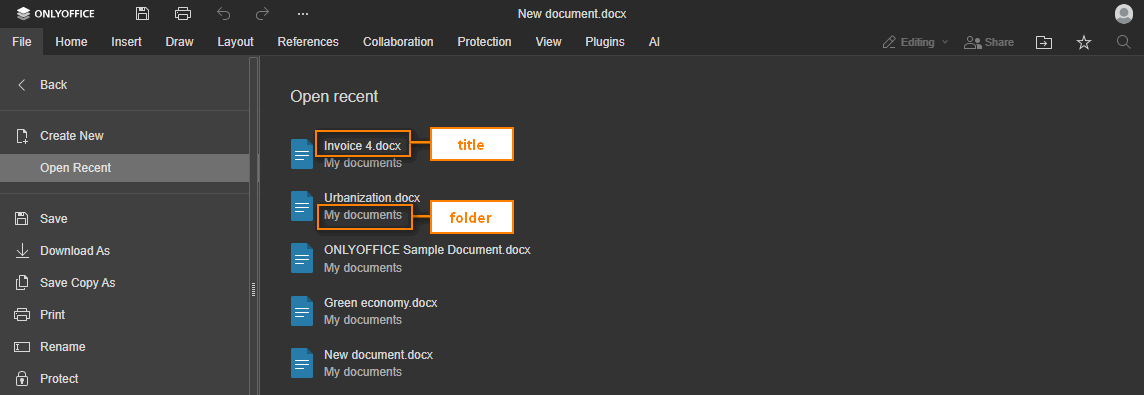
recent
type: object[]
The presence or absence of the documents in the Open Recent... menu option.
Example:
[
  {
    "folder": "Example Files",
    "title": "exampledocument1.docx",
    "url": "https://example.com/exampledocument1.docx"
  }
]
recent.folder
type: string
The folder where the document is stored. Can be empty if the document is in the root folder.
Example: "Example Files"
recent.title
type: string
The document title that will be displayed in the Open Recent... menu option.
Example: "exampledocument1.docx"
recent.url
type: string
The absolute URL to the document where it is stored.
Example: "https://example.com/exampledocument1.docx"
region
type: string | default: "en-US"
The default display format for currency, date, and time (in the Spreadsheet Editor only). Is set using the four-letter (en-US, fr-FR, etc.) language codes.
If lang is defined and a matching regional setting exists, the default value is taken from the lang parameter. Otherwise, en-US is used.
Starting from version 8.2, this parameter also defines the default measurement units in all editor types. For the ...-US or ...-CA regions, inches are used by default if other values are not specified in the editorConfig.customization.unit parameter.
Supported regional settings
| Code | Region |
|---|---|
ar-EG | Arabic (Egypt) |
ar-SA | Arabic (Saudi Arabia) |
az-Latn-AZ | Azerbaijani (Latin, Azerbaijan) |
bg-BG | Bulgarian (Bulgaria) |
cs-CZ | Czech (Czech Republic) |
da-DK | Danish (Denmark) |
de-AT | German (Austria) |
de-CH | German (Switzerland) |
de-DE | German (Germany) |
el-GR | Greek (Greece) |
en-AU | English (Australia) |
en-GB | English (United Kingdom) |
en-ID | English (Indonesia) |
en-US | English (United States) |
es-ES | Spanish (Spain) |
es-MX | Spanish (Mexico) |
fi-FI | Finnish (Finland) |
fr-CH | French (Switzerland) |
fr-FR | French (France) |
hu-HU | Hungarian (Hungary) |
id-ID | Indonesian (Indonesia) |
it-CH | Italian (Switzerland) |
it-IT | Italian (Italy) |
ja-JP | Japanese (Japan) |
ko-KR | Korean (Korea) |
lv-LV | Latvian (Latvia) |
nl-NL | Dutch (Netherlands) |
pl-PL | Polish (Poland) |
pt-BR | Portuguese (Brazil) |
pt-PT | Portuguese (Portugal) |
ru-RU | Russian (Russia) |
sk-SK | Slovak (Slovakia) |
sl-SI | Slovenian (Slovenia) |
sr-Cyrl-RS | Serbian (Cyrillic, Serbia) |
sr-Latn-RS | Serbian (Latin, Serbia) |
sv-FI | Swedish (Finland) |
sv-SE | Swedish (Sweden) |
tr-TR | Turkish (Turkey) |
uk-UA | Ukrainian (Ukraine) |
vi-VN | Vietnamese (Vietnam) |
zh-CN | Chinese (Simplified) |
zh-TW | Chinese (Traditional) |
Example: "en-US"
saveAsUrl
type: string
The absolute URL to the folder for saving files.
Instead of this parameter, use the onRequestSaveAs event.
Example: "https://example.com/url-to-save-folder"
sharingSettingsUrl
type: string
The absolute URL to the document sharing settings page.
Instead of this parameter, use the onRequestSharingSettings event.
Example: "https://example.com/url-to-sharing-settings"
templates
type: object[]
The presence or absence of the templates in the Create New... menu option.
Example:
[
  {
    "image": "https://example.com/exampletemplate1.png",
    "title": "exampletemplate1.docx",
    "url": "https://example.com/url-to-create-template1"
  }
]
templates.image
type: string
The absolute URL to the image for the template.
Example: "https://example.com/exampletemplate1.png"
templates.title
type: string
The template title that will be displayed in the Create New... menu option.
Example: "exampletemplate1.docx"
templates.url
type: string
The absolute URL to the document where it will be created and available after creation.
Example: "https://example.com/url-to-create-template1"


user
type: object
The user currently viewing or editing the document.
The request to the user's avatar is sent without authorization because the avatar URL is inserted into the HTML of the editor frame. A CORS issue may occur. In this case, use the avatar in the base64 format (e.g. "data:image/png;base64,*****").
If you are subscribed to the onRequestUsers event and send an avatar via the setUsers method, the user.image field in the initialization config is not required. It is not recommended to specify this parameter if the avatar is in base64 format and the initialization config is signed with JWT, since the token will become too long.
Example:
{
  "group": "Group1,Group2",
  "id": "78e1e841",
  "image": "https://example.com/url-to-user-avatar.png",
  "name": "John Smith",
  "roles": ["Role1"]
}
user.group
type: string
The group (or several groups separated with commas) the user belongs to. Can be used for customization.reviewPermissions, permissions.reviewGroups, or permissions.commentGroups.
Example: "Group1,Group2"
user.id
type: string
The identification of the user. The length is limited to 128 symbols. This information is stored and used to:
- distinguish co-authors,
- indicate the author of the last changes when saving and highlighting history (in the list of changes),
- count users with access for a license based on the number of users.
It is recommended to use a unique anonymized hash. Do not use sensitive data such as real name or email.
Example: "78e1e841"
user.image
type: string
The path to the user's avatar.
Example: "https://example.com/url-to-user-avatar.png"
user.name
type: string
The full name of the user. The length is limited to 128 symbols.
Example: "John Smith"
user.roles
type: string[]
The roles assigned to the user for PDF form filling. The first role in the array is used to determine which form fields the user can fill.
Example: ["Role1"]
customization
type: object
The customization section defines the editor customization parameters: standard branding and white label.
embedded
type: object
The embedded section defines the embedded mode parameters.
plugins
type: object
The plugins section defines the runtime plugin parameters.
wopi
type: object
The WOPI configuration section. Used only when the editor is integrated via WOPI.
wopi.FileNameMaxLength
type: integer | default: 250
The maximum length for file names that the WOPI host supports, excluding the file extension. Corresponds to the FileNameMaxLength property from CheckFileInfo.
Example: 20
Example
const config = {
  // ...
  editorConfig: {
    actionLink: {
      action: {
        type: "bookmark",
        data: "bookmark_name",
      },
    },
    callbackUrl: "https://example.com/url-to-callback",
    coEditing: {
      mode: "fast",
      change: true,
    },
    createUrl: "https://example.com/url-to-create-document",
    lang: "en",
    mode: "edit",
    recent: [
      {
        folder: "Example Files",
        title: "exampledocument1.docx",
        url: "https://example.com/exampledocument1.docx",
      },
    ],
    region: "en-US",
    templates: [
      {
        image: "https://example.com/exampletemplate1.png",
        title: "exampletemplate1.docx",
        url: "https://example.com/url-to-create-template1",
      },
    ],
    user: {
      group: "Group1,Group2",
      id: "78e1e841",
      image: "https://example.com/url-to-user-avatar.png",
      name: "John Smith",
    },
    customization: {
      // ...
    },
    embedded: {
      // ...
    },
    plugins: {
      // ...
    },
  },
};

const docEditor = new DocsAPI.DocEditor("placeholder", config);
The example.com is the name of the server where document manager and document storage service are installed. See the How it works section to find out more on ONLYOFFICE Docs service client-server interactions.